 CopyPal
The best Maccy alternatives for Mac in 2026
Maccy is the clipboard manager a lot of Mac users start with: free, open source, tiny, and fast. Most people who go looking for an alternative do not dislike it. They have simply started wanting things it was never meant to do. Here are five apps that add those things, and what each one costs you in return. We make one of them; read accordingly.
What Maccy does well
Maccy does one job with no fuss. Press a shortcut, a small list of your recent copies appears at the cursor, type a few letters to filter, press Return to paste. It remembers images as well as text, lets you pin items, ignores apps you tell it to, and uses almost no memory. It is free, and the code is open for anyone to read. For a plain text history it is close to perfect.
Why people outgrow it
- No memory of where things came from. A link copied from a chat and one copied from a documentation page look the same. There is no way back to the page.
- Screenshots are not searchable. Maccy 2.7 can copy the text out of an image you have open, but typing "invoice" does not find the screenshot of an invoice.
- No snippets. The signature you paste ten times a day is just another item in the list.
- No organisation beyond pins. No groups, no names, no filters by type.
Quick comparison
| App | Price model | Adds over Maccy | Trade-off |
|---|---|---|---|
| CopyPal | $10 one-time, 2 devices (Mac or PC) | Previews, app and page sources, searchable screenshots, snippets, groups, paste stack | Paid; macOS 14+ |
| Raycast | Free with the launcher | Previews, app source, snippets | Brings a whole launcher |
| Paste | Subscription, or $99.99 lifetime | Visual cards, pinboards, sync to iPhone and iPad | Costs the most; heavier UI |
| ClipBook | One-time purchase | Tags, names, text transforms, search inside images | No source page, no snippets |
| Alfred | One-time Powerpack licence | Snippets with placeholders, launcher features | Also a launcher; plain history |
Prices and features change. Every claim here reflects the apps' own websites as of September 2026; check before buying.
1. CopyPal
CopyPal keeps Maccy's keyboard-first flow, one shortcut, type to search, Return to paste, and adds the layer Maccy leaves out. Every item is filed with the app it came from and, for browsers, the page title and address. A preview pane shows the full text, the image, or the link with an Open page button, so you never paste blind.
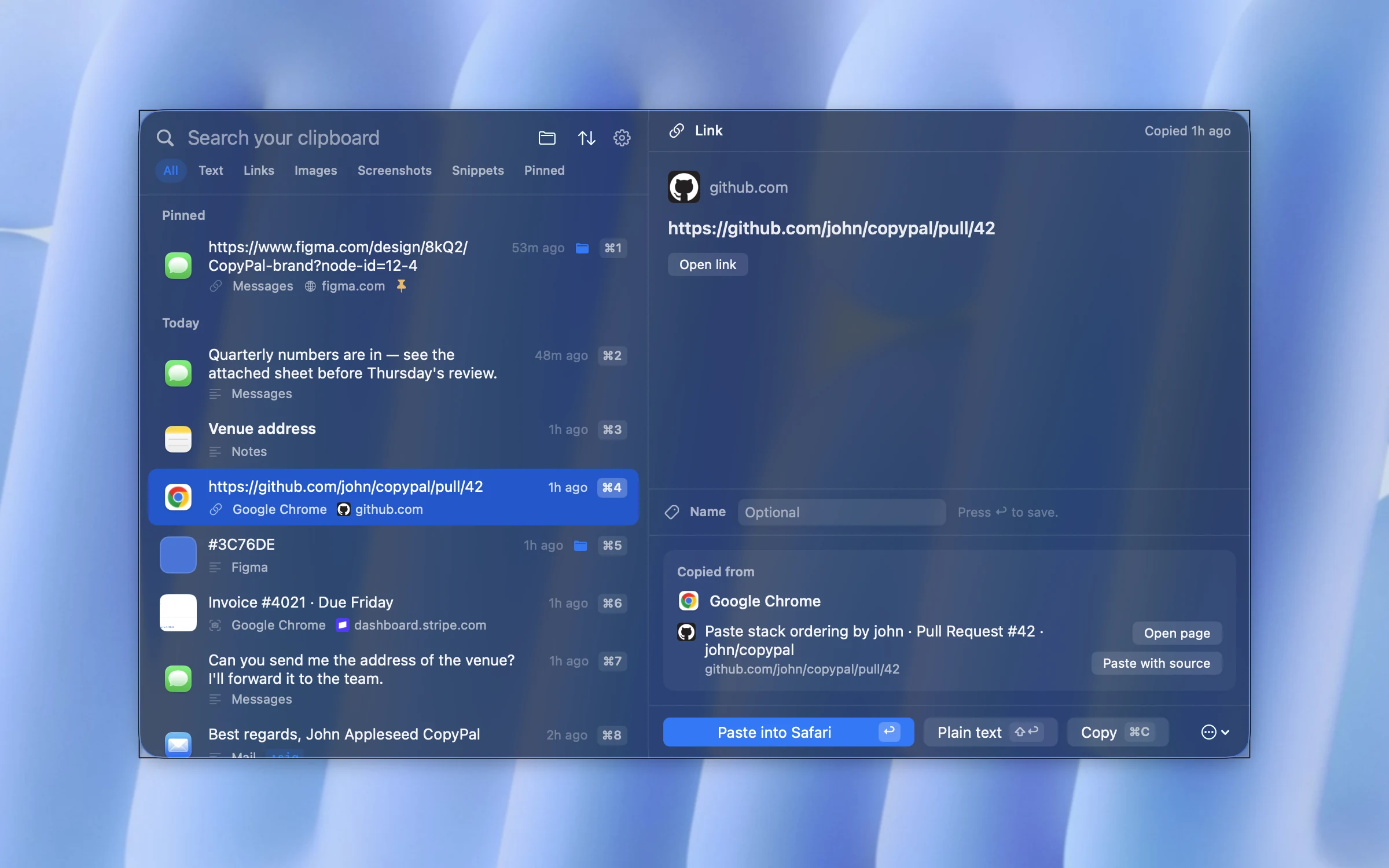
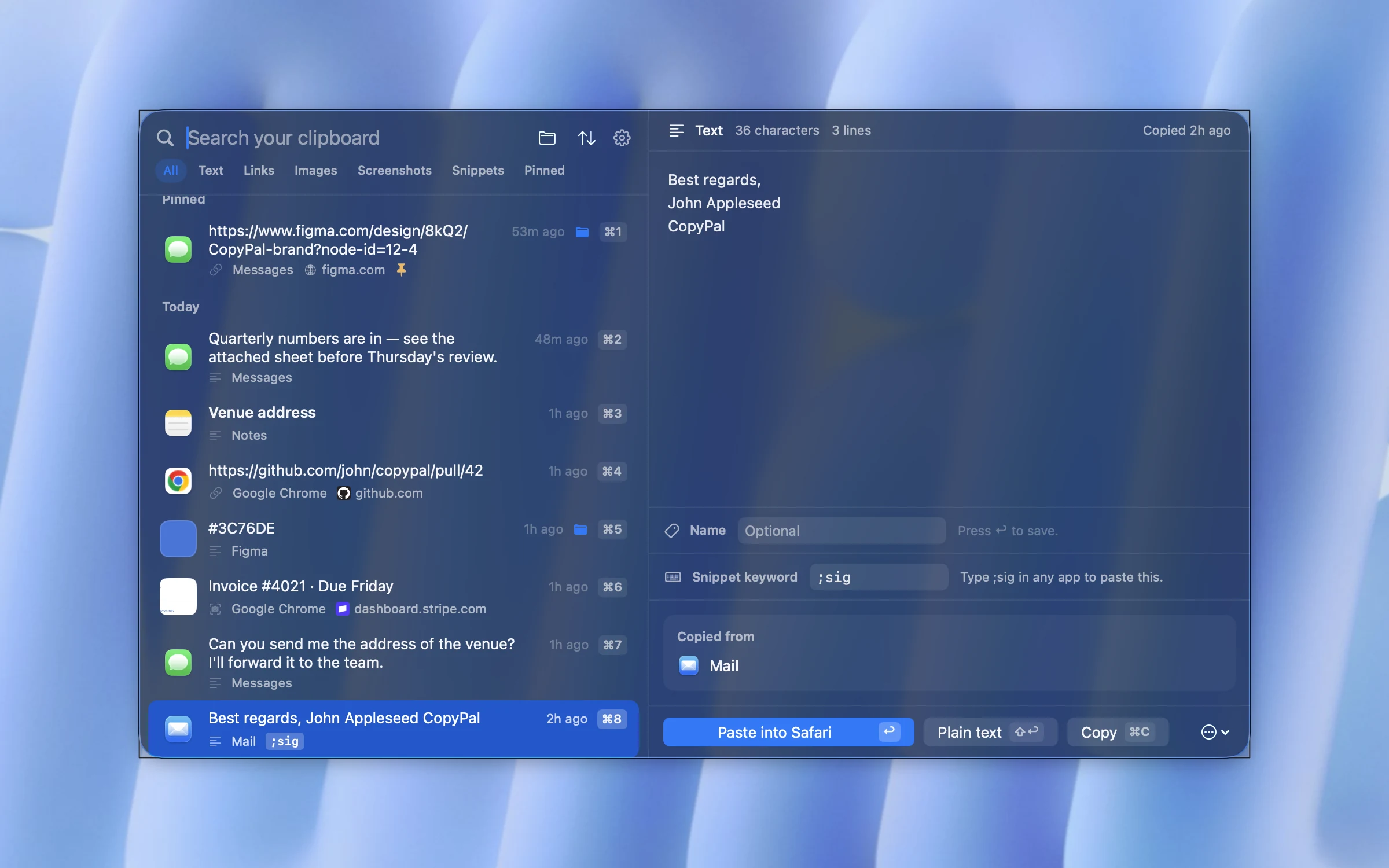
Screenshots are captured automatically and the text inside them is recognised on your Mac, so a word search finds the screenshot that contains it. Snippets expand when you type a keyword, a paste stack pastes several items at once, and groups, pins and names keep the things you reuse easy to find. Everything stays on your Mac. It costs $10 once for two devices, Mac or PC, with a 14-day refund.
What you give up from Maccy: it is not free, and it is not open source. The panel is larger than Maccy's popup by design, because it shows previews.
2. Raycast
Raycast's clipboard history comes free with its launcher and adds search inside copied images and a strong snippets feature. If you were going to install a launcher anyway, this is the shortest path to a richer clipboard.
What you give up: Maccy's independence and lightness. Raycast replaces Spotlight and runs a lot more than a clipboard.
3. Paste
Paste is the visual, card-based option with pinboards and iCloud sync to iPhone and iPad. Coming from Maccy it feels like a different category of app, which is either the point or the problem.
What you give up: it is the most expensive option here, at $3.99 a month, $29.99 a year or $99.99 once, and it has the heaviest interface of the group. Our Paste pricing guide breaks the plans down, and our Paste alternatives guide covers the app in more depth.
4. ClipBook
ClipBook is a one-time purchase that leans into text tools: tags, custom names, dozens of transformations such as case changes, merging and splitting items, multiple sort orders, and search inside images. It is open source, which Maccy fans tend to appreciate, and it supports macOS 13.
What you give up: it still does not know which web page a copy came from, and there is no snippet expansion.
5. Alfred
Alfred's Powerpack adds a clipboard history and an excellent snippets system to the launcher, with keyword expansion and placeholders for dates and clipboard contents. It is a one-time licence.
What you give up: the history is a plain list, closer to Maccy than to the others here, and the launcher comes with it.
Switching from Maccy: what to expect
- Shortcut. Maccy opens with ⇧⌘C by default; CopyPal uses ⇧⌘V. Either can be changed, so keep whichever your hands know.
- History. Nothing imports Maccy's list. Run both for a few days and let the new app fill up.
- Ignored apps. Set them up again in the new app. CopyPal also lets you ignore websites.
- Pins. Re-pin the handful of items you rely on. In CopyPal, ⌘P pins the selected item.
Frequently asked questions
Is Maccy free?
Yes. Maccy is open source and free to download from its website or GitHub. The Mac App Store version asks a small fee, which supports the developer.
What does Maccy not do?
Maccy keeps a plain history of text and images. It does not remember the web page a copy came from, does not search the text inside screenshots, has no snippet expansion and no groups. If you need any of those, you need a different app.
Which Maccy alternative is closest in feel?
CopyPal keeps the same keyboard-first flow, one shortcut, type to search, Return to paste, and adds sources, searchable screenshots and snippets. Raycast's clipboard history feels similar if you already use Raycast.