 CopyPal
The best clipboard managers for Mac in 2026, compared
A clipboard manager fixes the one thing macOS still gets wrong: it forgets everything except your last copy. There are plenty to choose from. We make one of them, so read this as an opinionated guide with the facts laid out, not a neutral review.
What a clipboard manager actually does
Every one of these apps does the same core job. It watches the clipboard, keeps a history of what you copy, and gives you a panel or menu to find an old item and paste it again. The differences are in what else they remember, how fast you can get to an item, what happens to images, and what they cost.
When comparing, we looked at five things that matter in daily office work:
- Price model. Free, one-time purchase, or subscription.
- Where it came from. Does the app remember which program and which web page a copy came from, so you can go back?
- Screenshots. Are screenshots kept, and can you find one by the words inside it?
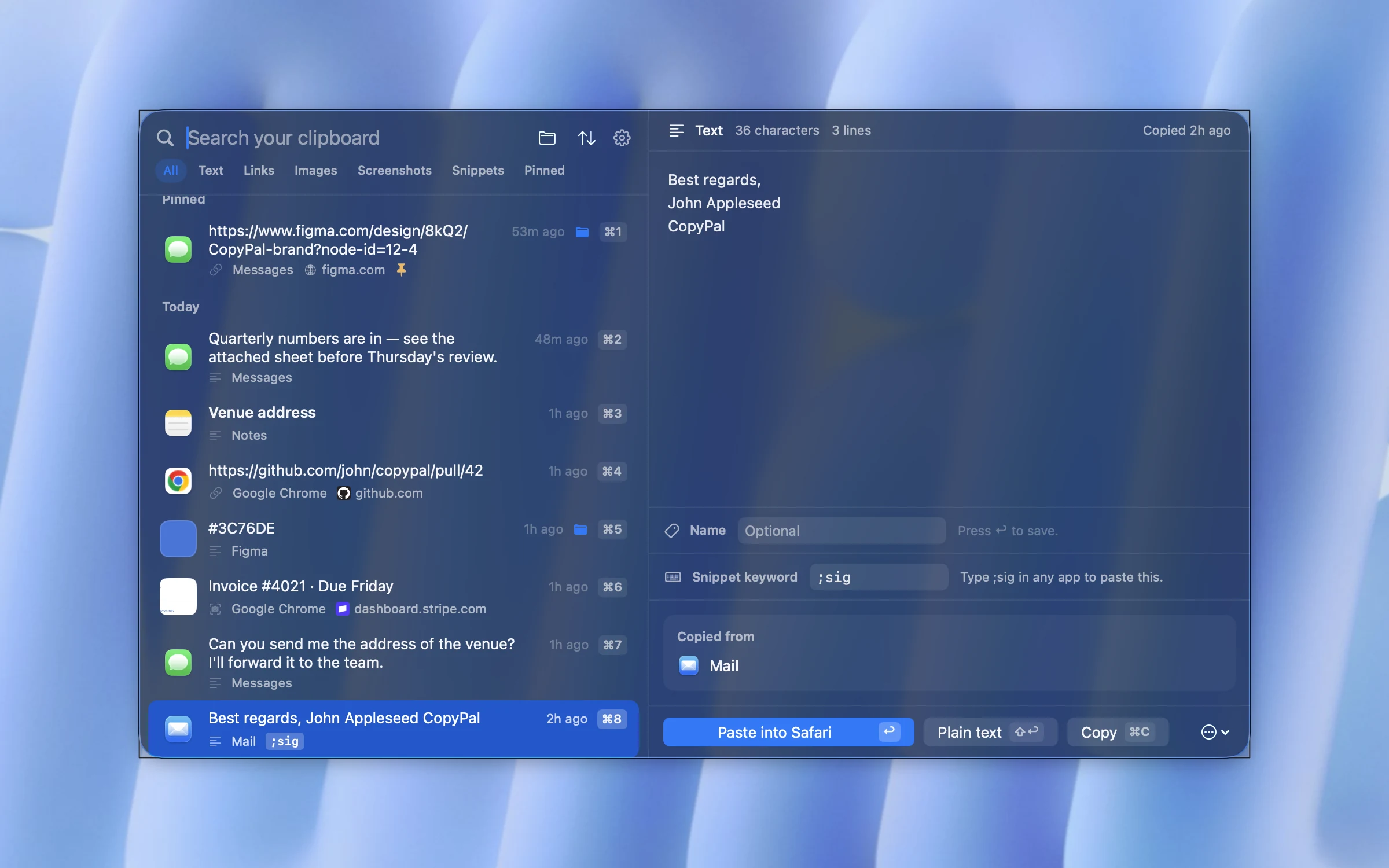
- Snippets. Can you type a short keyword and have it expand into a block of text?
- Privacy. Does your history stay on your Mac?
Quick comparison
| App | Price model | Remembers source page | Screenshots searchable by text | Snippets | Stays on your Mac |
|---|---|---|---|---|---|
| CopyPal | $10 one-time, 2 devices (Mac or PC) | Yes, app and page | Yes | Yes | Yes |
| Raycast | Free with the launcher; Pro keeps history longer | App only | Yes, with Text Recognition turned on | Yes | Yes; clipboard history is never synced |
| Paste | Subscription, or $99.99 lifetime | App only | Yes, search works inside images | No | Syncs through iCloud |
| Maccy | Free, open source | No | Images kept, no text search | No | Yes |
| ClipBook | One-time purchase | App only | Yes | No | Yes |
| CopyClip | Free | No | Text only | No | Yes |
"Not advertised" means the feature is not listed on the app's own website as of September 2026. Prices and features change; check each site before you buy.
CopyPal
CopyPal is the one we build, and it exists because of one frustration: knowing you copied something last week and having no idea where it came from. Every item CopyPal records is filed with the app it came from and, for browsers, the exact page. Select an old link and you get the page title, the address and an Open page button.
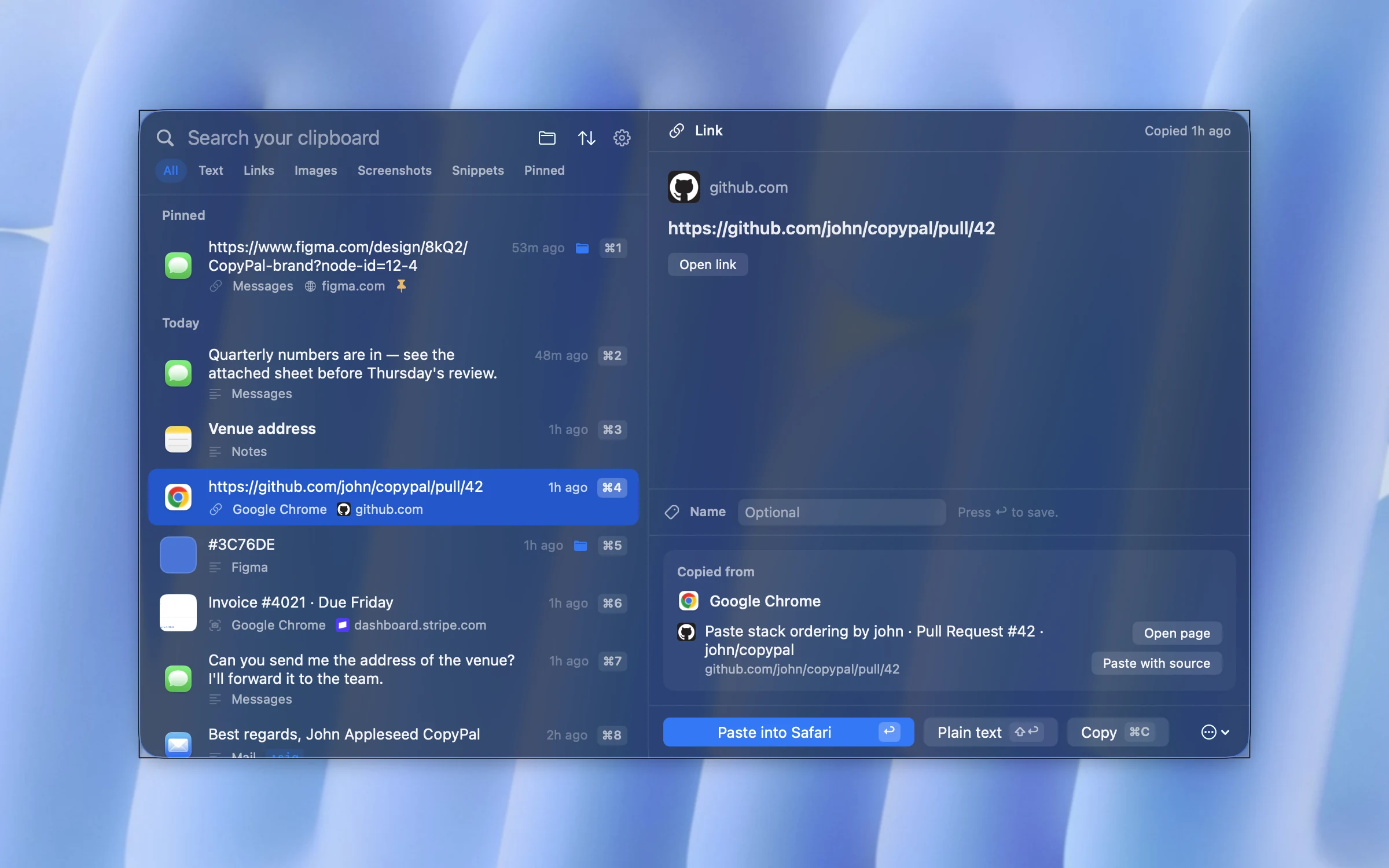
Screenshots are captured automatically, and the text inside them is recognised on your Mac, so a search for a word finds the screenshot that contains it. Add snippets that expand when you type a keyword, a paste stack for pasting several items in one go, groups for filing things, and it covers most of what people buy three different utilities for.
It is a one-time purchase that covers two devices, Mac or PC, and nothing leaves your machine. The trade-offs: it needs macOS 14 or later, and there is no free tier, only a 14-day refund. A Windows version shipped in September 2026, and one key covers a Mac and a PC.
Best for: people who copy from many apps and pages all day and want to find things again by what they were, not just by what they said.
Raycast
Raycast is a launcher first, and its clipboard history is one of many built-in extensions. If you already use Raycast to open apps and run commands, the clipboard history is right there and costs nothing. It keeps text, images, links and colours, can make the text in copied images searchable with its Text Recognition setting, and has a good snippets feature. The free plan keeps up to three months of history; longer needs Pro. More in Raycast clipboard history vs a clipboard manager.
The catch is that it comes with the whole launcher. If you do not want a Spotlight replacement, it is a heavy way to get a clipboard, and some features sit behind the Pro plan.
Best for: people who already live in Raycast.
Paste
Paste is the polished veteran of the category, with a visual, card-based history that many people love, pinboards for organising items, and sync across Mac, iPhone and iPad. It costs $3.99 a month or $29.99 a year, or $99.99 once for a lifetime plan, and the price is the main complaint you will read in its reviews (every plan explained). If you want your clipboard on your phone as well as your Mac, it is the obvious choice.
Best for: people who want their clipboard history synced to iPhone and iPad and do not mind paying for it.
Maccy
Maccy is free, open source and deliberately minimal. A keyboard shortcut opens a small list of your recent copies, you type to filter and press Return to paste. It is fast and stays out of the way. It does not try to remember where things came from, search inside images or expand snippets, and it does not want to.
Best for: anyone who wants a plain text history and nothing more, for free.
ClipBook
ClipBook is a newer one-time purchase app with a long feature list: tags, custom names, text transformations, merging and splitting items, sorting options, and search inside images. It supports macOS 13 and is open source. It does not track the web page a copy came from, and it has no snippet expansion.
Best for: people who want lots of ways to slice and transform text without a subscription.
CopyClip
CopyClip lives in the menu bar and keeps a plain list of copied text. It is free and simple, and that is its whole pitch. No images, no sources, no search inside anything. For someone who occasionally needs the thing they copied two steps ago, it may be all they ever need.
Best for: occasional use, text only, no budget.
How to choose
- You mostly copy text and want it free: Maccy or CopyClip.
- You already use Raycast: turn on its clipboard history before installing anything else.
- You want your clipboard on your iPhone too: Paste, and accept the price.
- You copy from many apps and web pages and want to find things later by where they came from, including screenshots: CopyPal.
- You want to transform and tag text heavily: ClipBook.
Keep reading
- How to see clipboard history on a Mac
- How to copy and paste multiple items at once on a Mac
- The best Paste alternatives for Mac in 2026
- The best Maccy alternatives for Mac in 2026
- Clipboard managers without a subscription: one-time purchase options in 2026
- Raycast clipboard history vs a dedicated clipboard manager