 CopyPal
Raycast clipboard history vs a dedicated clipboard manager
Raycast's Clipboard History is a free, built-in part of the Raycast launcher. It keeps text, images, files, links and colours, can search the words inside copied images, and holds items for up to three months free, or without limit on Raycast Pro. If you already open Raycast all day, it may be all the clipboard manager you need. If you don't want a launcher at all, a dedicated app is the better fit.
At a glance
| Question | Answer |
|---|---|
| Price | Free. Longer history comes with Raycast Pro, $10 a month or $96 a year |
| Open it | Type "Clipboard History" in Raycast, or give it your own hotkey |
| Keeps | Text, images, files, links, email addresses and colours |
| How long | 1 day to 3 months free; 6 months, 1 year or unlimited on Pro |
| Text in screenshots | Searchable, with Text Recognition turned on |
| Sync | No. Clipboard history always stays on the device |
| Runs on | Mac (current version: macOS 26 Tahoe, Apple silicon) and Windows 10 or 11 |
How to open Raycast clipboard history
Raycast is a launcher: a search bar you call up with a shortcut to open apps, run commands and, among many other things, browse your clipboard. Raycast's manual lists Command-Space (⌘Space) to open it, the same keys Spotlight uses by default, and you can change it in Raycast's Settings.
- Open Raycast, type Clipboard History and press Return. Your recent copies appear, newest first, with a preview on the right.
- Type to search. Press ⌘P to filter by type: Text, Images, Files, Links, Emails or Colors.
- Press Return to paste the selected item into the app you were in. ⌘K opens more actions, such as Paste as Plain Text, Edit Content, Rename Entry and Pin Entry.
- To skip the first step next time, open Raycast's Settings (⌘,) and give Clipboard History its own hotkey. Raycast doesn't set one for you.
If nothing is being recorded, check the switch at the top of Settings › Clipboard History, which turns the whole feature on and off.
What it keeps, and for how long
Raycast keeps every format an item was copied in, so Paste as… can give you rich text, plain text or HTML later. Several files copied together stay together as one entry. You can pin entries you reuse, rename them, and save any text entry as a snippet.
How long items stay is set under Settings › Clipboard History › Keep history for:
- Free: 1 day, 1 week, 1 month or 3 months.
- Pro: 6 months, 1 year or Unlimited as well.
One catch Raycast's manual points out itself: upgrading to Pro doesn't switch on longer retention. You have to choose it in Settings, or items still go after three months.
Can Raycast search the text in screenshots?
Yes. Turn on Text Recognition in Settings › Clipboard History and Raycast reads the text in images you copy, so a search for a word finds the screenshot that contains it. There are two modes: Fast, which uses less processor time, and Accurate, which copes better with small or faint text. An image entry also has Copy Text from Image and Copy Text from QR Code actions. For the ways macOS itself does this, see how to copy text from a screenshot on a Mac.
Raycast Pro adds an AI command, Ask Clipboard, that searches your history from a plain-language request. It is part of Raycast AI, which the free plan doesn't include.
Passwords and privacy
Under Disabled Applications you list apps whose copies Raycast should not record. Apple's Passwords app and Keychain Access are on the list already, and you can add your password manager or banking app with the + button. Raycast's site also says passwords copied from password managers and other short-lived data are ignored by default, and that history is stored encrypted on your Mac.
Clipboard history never leaves the device. Raycast's Cloud Sync, a Pro feature, syncs snippets, quicklinks, notes and settings between your computers, but its manual lists Clipboard History among the things that always stay put.
Is Raycast clipboard history on Windows?
Yes. Raycast for Windows left beta with version 2.0 on 25 August 2026, and it supports Windows 10 21H2 or later and Windows 11. The manual lists Clipboard History and Snippets for both systems; a few options, such as saving items from iPhone through Universal Clipboard and Paste as PNG, are Mac only. Raycast says it is still bringing features from the Mac version across.
On the Mac, note that the current Raycast needs macOS 26 Tahoe and an Apple silicon Mac. Its website says so plainly: if you are on Sequoia or earlier, you need to upgrade macOS first.
Raycast clipboard history vs Paste
Paste is a dedicated clipboard manager rather than a launcher, and the two make different promises.
- Devices. Paste runs on Mac, iPhone and iPad and keeps your history in sync through iCloud. Raycast keeps clipboard history on one computer.
- Several items in order. Paste has Paste Stack: press Shift-Command-C (⇧⌘C), copy a few things, and each ⌘V pastes the next one. Raycast has Paste Sequentially, which walks back through your recent history, newest first, one paste at a time.
- Organising. Paste has pinboards for saved items. Raycast has pins, renamed entries and type filters.
- Snippets. Raycast's Snippets expand a keyword you type in any app. Paste's site doesn't advertise keyword expansion.
- Price. Raycast's clipboard history is free. Paste costs $3.99 a month, $29.99 a year or $99.99 once, after a 7-day trial. Our Paste pricing guide covers every plan.
Both search text inside images and both show you previews. If you want your clipboard on your phone, Paste. If you live in Raycast already, Raycast.
Is Raycast a good clipboard manager?
For the clipboard alone, yes. The real question is whether you want a launcher at all, and for many people the answer is no. Raycast replaces the way you open apps, search files and run commands. That suits people who like to drive everything from the keyboard. Someone who mostly works in Outlook, Excel and a browser, and just wants yesterday's copied address back, is being asked to learn a new tool to get there.
A dedicated clipboard manager does one job: one shortcut opens your history, you type, you paste. There is nothing else to set up and nothing else to learn. And if you're on macOS 26 or later and only need the last few days, the free history built into Spotlight may do: press ⌘Space, then ⌘4. Our guide to macOS clipboard history explains how to turn it on.
When a dedicated clipboard manager is the better choice
We make one, CopyPal, so here is what it does differently from Raycast, and you can judge whether it matters to you.
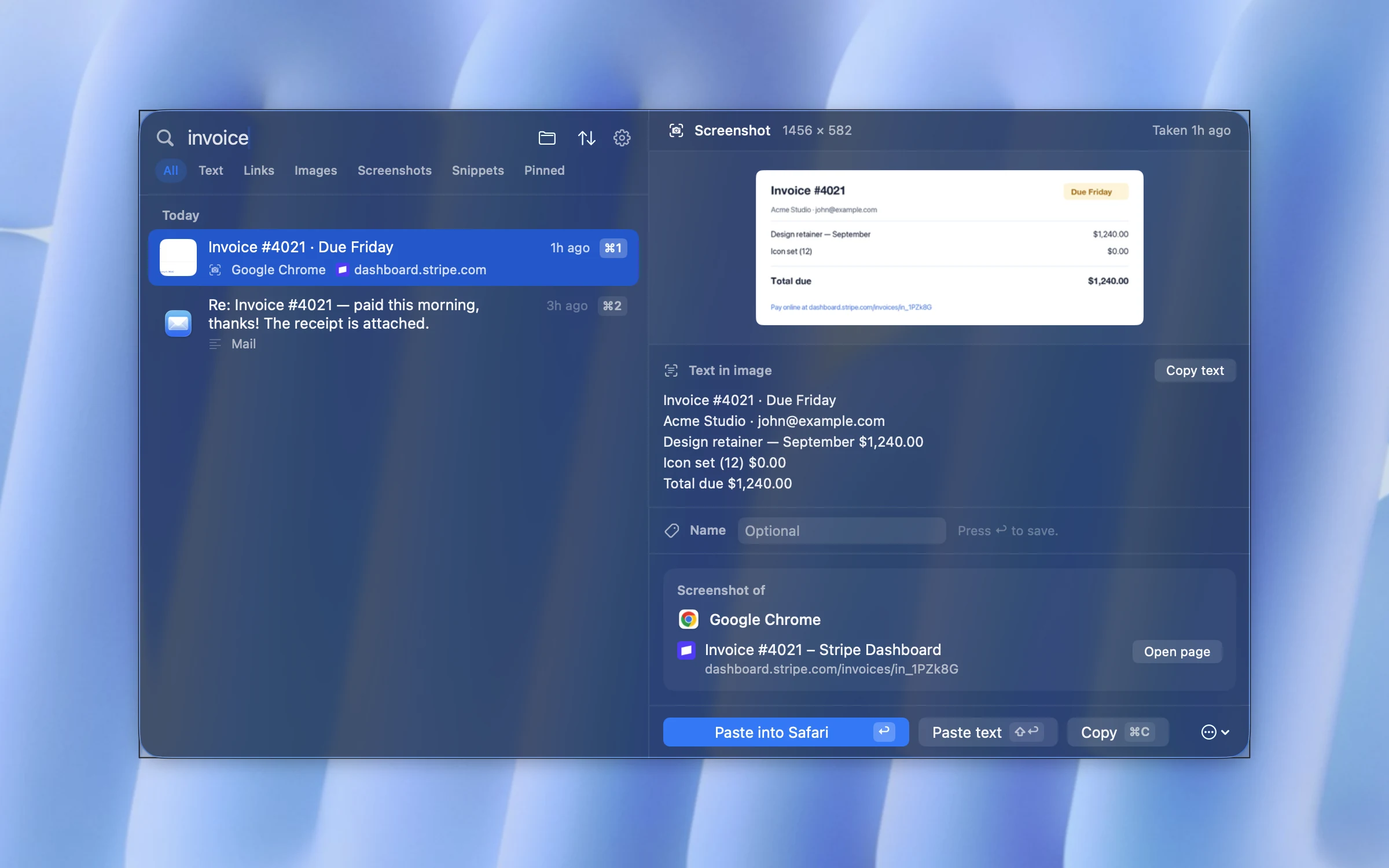
- It remembers where things came from. Every item is filed with the app it was copied from and, for Safari, Chrome, Edge, Arc, Brave and Vivaldi, the page title and address, with an Open page button. Raycast's manual doesn't say it records the page a copy came from.
- A paste stack you build yourself. Press ⌘S on the items you want, in the order you want, then paste them all at once or one per ⌘V. Raycast's Paste Sequentially follows your history order instead; see how to paste several items at once.
- Screenshots by their words. Like Raycast, CopyPal reads the text in screenshots on your Mac, and it also files each screenshot with the app or page it was taken of.
- Snippets. Give any text a keyword such as
;sigand type it anywhere. Raycast does this well too, so this one is a draw. - No launcher, older Macs, and Windows. It lives in the menu bar, opens with Shift-Command-V (⇧⌘V), runs on macOS 14 Sonoma and later on Apple silicon and Intel, and on Windows.
- Price. $10 once for two devices, Mac or PC, with no subscription. Raycast's clipboard is free; its unlimited history is part of a Pro plan that starts at $96 a year.
What you give up compared with Raycast: everything else Raycast does, its AI features, and the price of free. CopyPal also has no sync between computers.
Side by side
| Raycast | Paste | CopyPal | |
|---|---|---|---|
| Price | Free; Pro $10 a month or $96 a year | $3.99 a month, $29.99 a year or $99.99 once | $10 once, 2 devices |
| Runs on | Mac (macOS 26, Apple silicon) and Windows | Mac, iPhone, iPad | Mac (macOS 14+) and Windows |
| How long it keeps items | Up to 3 months; unlimited on Pro | No limit | 1,000 items by default, up to unlimited |
| Text in screenshots | Searchable | Searchable | Searchable |
| Remembers the web page | Not advertised | App only | Yes, app and page |
| Several items in order | Paste Sequentially, newest first | Paste Stack | Paste stack, all at once or one by one |
| Keyword snippets | Yes | Not advertised | Yes |
| Syncs history | No | Yes, through iCloud | No |
| Comes with a launcher | Yes | No | No |
Based on each company's own website and documentation as of October 2026. "Not advertised" means we couldn't find the feature there. Prices and features change; check before you decide.
The verdict
- You already use Raycast every day: set a hotkey for Clipboard History, turn on Text Recognition, and see if you miss anything. You may not.
- You want your clipboard on your iPhone and iPad: Paste.
- You only need the last few days on macOS 26 or later: Spotlight's built-in history, free.
- You don't want a launcher, your Mac is older or Intel, or you want to find things by the page they came from: a dedicated clipboard manager such as CopyPal.
Frequently asked questions
Is Raycast's clipboard history free?
Yes. Clipboard History is part of Raycast's free plan and keeps items for up to 3 months. Raycast Pro, at $10 a month or $96 a year, adds 6 months, 1 year or unlimited history, which you have to pick yourself in Settings › Clipboard History.
How do I open clipboard history in Raycast?
Open Raycast, type Clipboard History and press Return. Raycast sets no hotkey for it by default, so give it one in Raycast's Settings to open it directly from any app.
Does Raycast sync clipboard history between Macs?
No. Raycast's manual lists Clipboard History among the things that always stay on your device, even with Cloud Sync on Raycast Pro. Snippets do sync with Cloud Sync.
Can Raycast search the text in screenshots?
Yes. With Text Recognition turned on in Settings › Clipboard History, Raycast reads the text in images you copy so a search finds them. There is also a Copy Text from Image action.
Is Raycast available on Windows?
Yes. Raycast for Windows left beta with version 2.0 on 25 August 2026 and supports Windows 10 21H2 or later and Windows 11. Raycast's manual lists Clipboard History for both Mac and Windows, with a few options, such as Universal Clipboard, on the Mac only.
Should I use Raycast or Paste for clipboard history?
If you already use Raycast every day, its clipboard history is free and may be all you need. Choose Paste if you want the same history on your iPhone and iPad through iCloud, and do not mind its subscription or $99.99 lifetime price.