 CopyPal
The best Clipy alternatives for Mac in 2026
Clipy is not dead. After almost eight years without a release, version 1.3.0 arrived on 20 June 2026 with native Apple silicon support, and 1.4.0 followed on 12 October 2026. So if Clipy stopped working, update it before you replace it. If you want search, bigger previews or snippets you can type, here are six alternatives, what each costs, and what you give up.
The short answer
- Clipy stopped working: install Clipy 1.4.0 and check its Accessibility permission.
- Closest free replacement: Maccy. Same menu bar habit, plus a search box.
- Free and built in: Spotlight's clipboard history on macOS 26 Tahoe and later.
- You already use a launcher: Raycast, with clipboard history and snippets.
- You want it on your iPhone too: Paste.
- You want lots of text tools: ClipBook.
- You want snippets you type, searchable screenshots and the page each copy came from: CopyPal, which we make.
Is Clipy still maintained?
Yes. For years the last release was 1.2.1, from October 2018. In May 2026 its developer wrote on GitHub that Clipy had not been abandoned and that development was restarting, starting with native Apple silicon builds.
That happened. Clipy 1.3.0 (20 June 2026) is built for Apple silicon, moves Clipy's data to a new database, and needs macOS 13 Ventura or later. Clipy 1.4.0 (12 October 2026) redesigned Settings and added automatic history clean-up and HTML support. Clipy is still free and open source under the MIT licence.
One thing to know: since 1.3.0, Clipy sends usage statistics and crash reports through Google's Firebase by default. Its privacy policy says copied content is never sent, and both can be turned off in Clipy's settings.
Clipy not working? Check these first
- Update to 1.4.0. Download it from clipy-app.com or GitHub. If you are coming from a version before 1.3.0, export your snippets first: the release notes warn that the move to the new database runs automatically but may fail in some cases.
- Re-grant Accessibility. Clipy needs it to paste for you. Open System Settings › Privacy & Security › Accessibility and make sure Clipy is listed and turned on. macOS ties this permission to the app's signature, so after installing a new version you may need to remove Clipy from the list with the − button and add it again.
- Check Rosetta on macOS 27. Clipy versions before 1.3.0 were built for Intel Macs and run on Apple silicon only through Rosetta, Apple's translation layer. Apple's macOS 27 release notes say Rosetta is not automatically restored after upgrading, so an old Clipy may not open until you install Rosetta again. Updating to 1.4.0 is the better fix.
- Look for a shortcut clash. Clipy opens its main menu with Shift-Command-V (⇧⌘V), its history with Control-Command-V (⌃⌘V) and its snippets with Shift-Command-B (⇧⌘B). Paste and CopyPal also use ⇧⌘V by default, so if another clipboard app is running, change one of them in Settings › Shortcuts.
- Still broken? Report it on Clipy's GitHub issues page, which is active again.
What Apple has said about Rosetta
In its developer documentation, Apple says Rosetta will be available through macOS 27 "as a general-purpose tool for Intel apps", after which it keeps only a subset aimed at older games. The macOS 27 release notes add that Intel-based software will not be compatible with macOS 28, apart from legacy games, and list the affected apps in System Settings › General.
Clipy 1.3.0 and later are native, so a current Clipy is not affected. An un-updated Clipy 1.2.1 on an Apple silicon Mac has until macOS 28 at the latest.
Why people look for a Clipy alternative
- No search. Clipy's history is a menu, so finding this morning's copy means scanning folders by eye. A search box is an open request on GitHub.
- Small previews. Long text appears as one line in a menu and a tooltip; there is no preview pane.
- Snippets you pick from a menu. Clipy's snippet folders are good for canned replies, but Clipy doesn't advertise typing a short keyword to expand one.
- Screenshots are only pictures, for now. Clipy 1.4.0 reads their text internally, but you can't search it yet.
- Mac only, no sync. Your history lives on one Mac.
If none of that bothers you, update Clipy and keep it. It is free and, once again, maintained.
Quick comparison
| App | Price | Search | Snippets | Trade-off |
|---|---|---|---|---|
| Clipy, for reference | Free, open source | No | Yes, in folders, picked from a menu | Menus only |
| Maccy | Free, open source; $9.99 on the App Store | Yes | No, pins only | No snippet folders |
| Spotlight | Free, built in | Yes | No | Keeps 7 days at most; macOS 26+ |
| Raycast | Free; Pro for longer history | Yes, including text in images | Yes, keywords and tags | A whole launcher; macOS 26 and Apple silicon |
| Paste | $3.99 a month, $29.99 a year or $99.99 once | Yes, including text in images | Pinboards, no keywords advertised | Costs the most |
| ClipBook | One-time purchase | Yes, including text in images | Not advertised | No snippets |
| CopyPal | $10 one-time, 2 devices | Yes, including text in screenshots | Yes, keywords, plus groups | Paid; macOS 14+ |
Prices and features come from each app's own website, App Store page or GitHub as of October 2026. "Not advertised" means we couldn't find the feature there.
1. Maccy: the closest free replacement
Maccy feels the most like Clipy: free, open source, a menu bar icon, and a small list of recent copies at a shortcut, Shift-Command-C (⇧⌘C) by default. The difference is that you type to filter instead of scanning menus. It has a preview panel and a button to copy the text out of an image, and you can pin items and ignore apps. It needs macOS 14 Sonoma or later and is free from maccy.app, or $9.99 on the Mac App Store to support the developer.
What you give up: Clipy's snippet folders. Maccy has pins, not snippets. Our Maccy alternatives guide covers what it leaves out.
2. Spotlight clipboard history: free, built in
On macOS 26 Tahoe and later, Spotlight keeps a clipboard history. Turn on System Settings › Spotlight › Results from Clipboard, then press Command-Space (⌘Space) followed by Command-4 (⌘4). It shows the app each item came from and keeps items for 30 minutes, 8 hours or 7 days. Our guide to macOS clipboard history has the details.
What you give up: snippets, pins and anything older than a week. It also needs macOS 26, while Clipy runs on macOS 13.
3. Raycast: if you want a launcher too
Raycast is a launcher whose free Clipboard History keeps up to three months of copies (unlimited with Pro, $10 a month or $96 a year) and searches the text in copied images. Its Snippets feature, with keywords that expand in any app and tags for grouping, replaces Clipy's snippets most directly. More in Raycast clipboard history vs a clipboard manager.
What you give up: simplicity. You adopt a whole launcher. The current Raycast also needs macOS 26 Tahoe and an Apple silicon Mac.
4. Paste: if you want your iPhone too
Paste is the polished, visual option: cards with previews, pinboards for saved items, search that finds text inside images, and history synced through iCloud to iPhone and iPad.
What you give up: money and lightness. Paste costs $3.99 a month, $29.99 a year or $99.99 once; see our Paste pricing guide. Pinboards hold saved items, but Paste doesn't advertise typed keyword snippets.
5. ClipBook: if you want text tools
ClipBook is a one-time purchase, $9.99 for one Mac on its site in October 2026, with a note that the price is going up, and a 5-day free trial. Like Clipy it runs on macOS 13 Ventura or later, and its source code is public. It adds names and tags, 78 text transformations, search inside images and pasting items one by one.
What you give up: snippets. ClipBook doesn't advertise them, so Clipy's snippet folders have nowhere obvious to go.
6. CopyPal: snippets you type, and where things came from
CopyPal is ours, so read this as a pitch with the reasons shown. It lives in the menu bar like Clipy and opens with the same Shift-Command-V (⇧⌘V), but as a searchable panel with a preview. Every item is filed with the app it came from and, for Safari, Chrome, Edge, Arc, Brave and Vivaldi, the page title and address. Text in screenshots is recognised on your Mac, so a search finds the screenshot that contains a word.
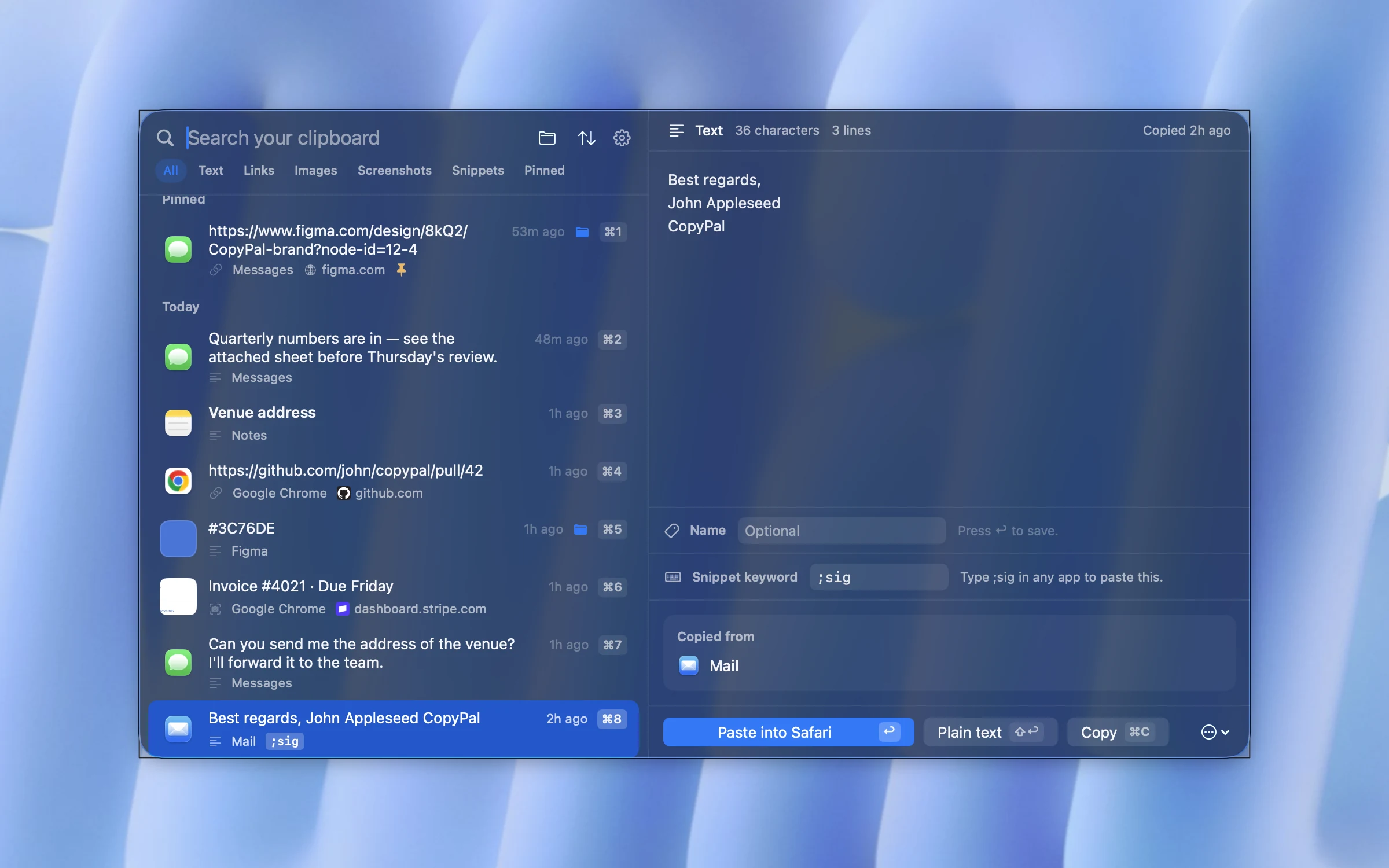
For Clipy users, snippets are the main point. Give any text a keyword such as ;sig, type it in any app, and CopyPal replaces it with the full text. Pin, name and group items too, for example a "Replies" group for canned answers. Pinned, named and grouped items and snippets are never pruned. It needs macOS 14 Sonoma or later and costs $10 once for two devices, Mac or PC, with a 14-day refund.
What you give up: free and open source, and macOS 13 support.
Where do Clipy's snippet folders go?
If you rely on Clipy's snippets, here is where they land:
- Raycast: Snippets, with keywords that expand anywhere and tags for grouping. The closest match.
- CopyPal: snippets with keywords, plus groups for the folder feel.
- Paste: pinboards hold saved items you paste from the panel.
- Maccy and ClipBook: Maccy has pins, ClipBook has names and tags; neither advertises snippets.
- Spotlight: none. For short phrases, macOS has Text Replacements under System Settings › Keyboard; our guide to text shortcuts on a Mac shows how.
None of these apps advertises importing Clipy's snippets, so export them from Clipy as a backup and copy the ones you use into the new app.
Switching from Clipy
- Export your snippets first, whichever way you go.
- Free up the shortcut. If the new app also wants ⇧⌘V, quit Clipy or change its shortcut.
- Set up ignored apps again, such as your password manager. History itself doesn't move; the new app starts its own.
Frequently asked questions
Is Clipy still being developed?
Yes. After almost eight years without a release, Clipy 1.3.0 came out on 20 June 2026 and 1.4.0 on 12 October 2026. Both are free from clipy-app.com and GitHub and need macOS 13 Ventura or later.
Does Clipy work on Apple silicon Macs?
Yes, natively, since version 1.3.0. Older versions were built for Intel Macs and run on Apple silicon only through Rosetta, which Apple says remains a general-purpose tool only through macOS 27.
Why is Clipy not working on my Mac?
Start with two checks: the version and a permission. Update to Clipy 1.4.0, exporting your snippets first if you are coming from a version before 1.3.0. Then check System Settings › Privacy & Security › Accessibility: Clipy must be listed and turned on to paste for you.
Is Clipy free?
Yes. Clipy is free and open source under the MIT licence. The developer accepts donations through Open Collective and GitHub Sponsors.
What is the closest alternative to Clipy?
Maccy. It is also free and open source, lives in the menu bar and opens a small list of recent copies with a shortcut, and it adds a search box, which Clipy does not have. It has no snippets, though.
Which Clipy alternatives have snippets?
Raycast and CopyPal both have snippets that expand when you type a keyword in any app, and Alfred's Powerpack has them too. Paste keeps saved items in pinboards. Maccy and ClipBook do not advertise snippet expansion. For short phrases, macOS has Text Replacements built in.