 CopyPal
The best Pastebot alternatives for Mac in 2026
Pastebot is still supported. Tapbots released Pastebot 3, which reached the Mac App Store in July 2026 and was last updated there on 1 September 2026. What changed is the deal: Pastebot 3 needs macOS 26 Tahoe, and it costs $39 with a year of updates, or a subscription on the App Store. If either is why you are looking, here are six alternatives and what each one gives up.
Pastebot at a glance
| Question | Answer, as of October 2026 |
|---|---|
| Still supported? | Yes. Pastebot 3 reached the Mac App Store in July 2026 |
| Latest update | 3.1.2 on the Mac App Store, 1 September 2026 |
| Needs | macOS 26 Tahoe or later |
| Price direct | $39 with one year of updates; $19 for each further year |
| Price on the App Store | $24.99 a year or $2.99 a month |
| Free trial | 14 days, either way |
| Pastebot 2 | Still offered as a download on Tapbots' site |
Is Pastebot still supported?
Yes. Pastebot 3 is a new major version from Tapbots, the company behind the Ivory app. It first appeared on the Mac App Store on 28 July 2026, and version 3.1.2, the latest as of this writing, arrived on 1 September 2026.
Pastebot 2 is a different story. Tapbots' Pastebot page still links to "the old Pastebot 2 download", but we could not find Pastebot 2 on the US Mac App Store in October 2026, and Tapbots doesn't say how long it will support it. If you bought Pastebot 2 directly, Tapbots offers a $12.99 discount on Pastebot 3: enter your old licence key in the promo code box when you buy.
What Pastebot does well
- Filters. Pastebot's best feature. Build a filter from base filters stacked together, preview it live, give it a shortcut, and apply it to text before pasting.
- Stacks. Called the sequential paste queue in Pastebot 2. Press the right arrow on a clipping to add it, or copy things while the stack window is open, then paste them one after another with Control-Command-V (⌃⌘V).
- Pastebins. Custom Pastebins keep clippings for good, with a colour and icon; Smart Pastebins fill themselves by rules.
- Quick paste menu. Shift-Command-V (⇧⌘V) in any app, and a number key pastes one of your last ten copies.
- iCloud sync of clippings, pastebins and filters between your Macs.
- Blacklists that block an app entirely, or ignore only its images, text or shortcuts.
If you are on macOS 26 and happy to pay, Pastebot 3 is still one of the most capable clipboard managers on the Mac. Try it before you replace it.
Why people look for a Pastebot alternative
- macOS 26 only. If your Mac runs Sequoia, Sonoma or earlier, Pastebot 3 won't install.
- The price model. Pastebot 3 is either a subscription or $39 with a year of updates, after which you keep the version you have or pay $19 for another year. Some people would rather pay once and be done.
- Mac only. It works with Universal Clipboard, but Tapbots doesn't offer an iPhone or Windows version of Pastebot.
- Things it doesn't advertise: snippets that expand when you type a keyword, finding a screenshot by the words in it, or remembering which web page a copy came from.
Quick comparison
| App | Price | Paste several in order | Transform text | Sync |
|---|---|---|---|---|
| Pastebot 3, for reference | $39 + $19 a year for updates, or $24.99 a year | Stacks | Custom filters | iCloud, between Macs |
| Paste | $3.99 a month, $29.99 a year or $99.99 once | Paste Stack | Not advertised | iCloud, with iPhone and iPad |
| Maccy | Free; $9.99 on the App Store | No | Paste as plain text | No |
| Raycast | Free; Pro for longer history | Paste Sequentially, newest first | Paste as plain text, edit | Snippets only, with Pro |
| ClipBook | One-time purchase | Paste in sequence | 78 transformations | No; export and import |
| Alfred | Powerpack £34, one-time | Not advertised | Not advertised | Not advertised |
| CopyPal | $10 one-time, 2 devices | Paste stack, all at once or one by one | Plain text, clean links | No |
Prices and features come from each app's own website or App Store page as of October 2026. "Not advertised" means we couldn't find the feature there. Check before you buy.
1. Paste: the closest match
Paste covers most of what Pastebot does, in a more visual way. Pinboards play the part of Custom Pastebins, Paste Stack plays the part of Pastebot's stacks (press Shift-Command-C, ⇧⌘C, copy a few things, and each ⌘V pastes the next), and search finds text inside images. Unlike Pastebot, it runs on iPhone and iPad as well, with history synced through iCloud.
What you give up: Pastebot's filters, and money. Paste costs $3.99 a month, $29.99 a year or $99.99 once; our Paste pricing guide breaks it down.
2. Maccy: free and simple
Maccy is free and open source: a shortcut, Shift-Command-C (⇧⌘C), opens a small list of recent copies, you type to filter and press Return. It keeps images, lets you pin items and ignore apps, pastes without formatting, and has a preview panel. It needs macOS 14 Sonoma or later, so it suits a Mac that can't run Pastebot 3. It is free from maccy.app, or $9.99 on the App Store to support the developer.
What you give up: filters, stacks, pastebins and sync. Maccy is deliberately plain.
3. Raycast: free, with a sequence of its own
Raycast is a launcher with a free Clipboard History. Its Paste Sequentially command pastes your recent copies one per run, newest first, which works well for filling in a form. It searches text in copied images, pastes as plain text, and has Snippets that expand a keyword in any app. Free history lasts up to three months; Pro ($10 a month or $96 a year) makes it unlimited. Our Raycast clipboard history guide goes into detail.
What you give up: a stack you build by hand, filters, and clipboard sync, which Raycast never syncs. You also adopt a launcher, and the current Raycast needs macOS 26 Tahoe and an Apple silicon Mac.
4. ClipBook: the filter fan's choice
ClipBook is the nearest thing to Pastebot's filters: 78 text transformations you apply before pasting. It also pastes items in sequence with Control-V (⌃V), lets you name and tag items, finds images by the text in them, and filters history by type, tag or source app. It is a one-time purchase, $9.99 for one Mac on its site in October 2026 with a note that the price is going up, with a 5-day free trial. It runs on macOS 13 Ventura or later.
What you give up: sync. ClipBook uses no cloud; you move history to another Mac with export and import.
5. Alfred: snippets first
Alfred is a launcher whose Powerpack, £34 for a single licence, adds a clipboard history kept for 24 hours, 7 days, 1 month or 3 months, and a strong snippets feature. Snippets expand when you type a keyword and can include placeholders for the date, time and clipboard. With merging turned on, holding Command and pressing C twice adds the selected text to your previous copy.
What you give up: Pastebot's stacks and filters, and you get a launcher whether you want one or not.
6. CopyPal: a paste stack, plus where things came from
CopyPal is the one we make, so take this as a pitch with the reasons shown. Its paste stack is the counterpart to Pastebot's stacks: select an item and press ⌘S to add it, repeat in the order you want, then paste them all at once or one per ⌘V. It is handy for filling in forms, or moving a name, an email address and a phone number into a contact record. Our guide to pasting several items at once shows the whole flow.
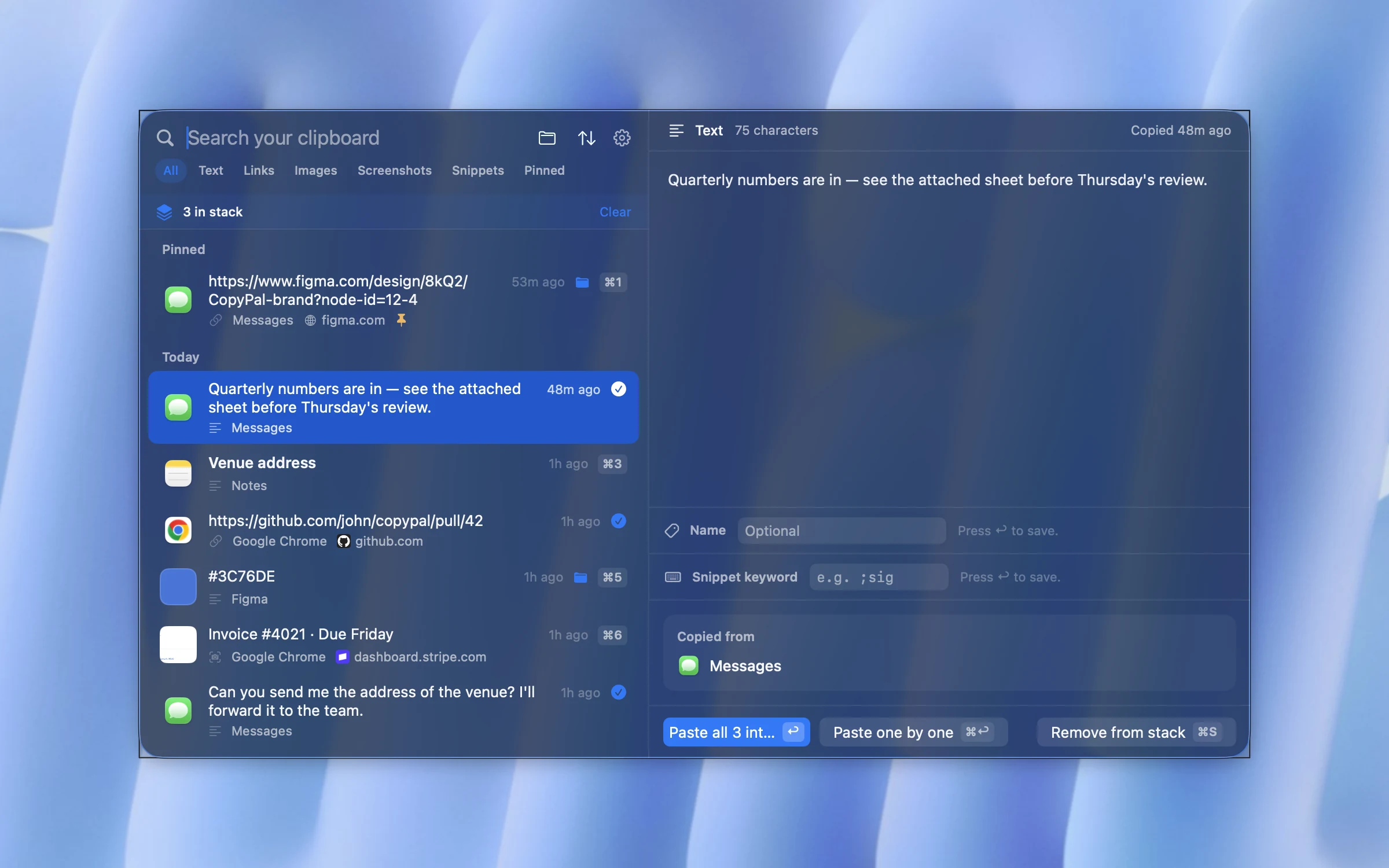
Instead of Pastebot's custom filters, CopyPal has a few fixed ones: paste any item as plain text with ⇧Return, or as a link with the tracking removed (see removing tracking from links). It adds what Pastebot doesn't advertise: every item filed with its app and, for browsers, the page title and address; text in screenshots recognised so you can search it; and snippets that expand when you type a keyword such as ;sig. It runs on macOS 14 Sonoma and later, so it also suits Macs that can't run Pastebot 3, and costs $10 once for two devices, Mac or PC.
What you give up: custom filters, iCloud sync between Macs, and Shortcuts and command-line access.
Which app replaces which Pastebot feature?
- Stacks (sequential paste): Paste Stack in Paste, paste in sequence in ClipBook, the paste stack in CopyPal, Paste Sequentially in Raycast.
- Filters: ClipBook comes closest. CopyPal and Maccy cover plain text; CopyPal also cleans tracking from links.
- Custom Pastebins: pinboards in Paste, groups in CopyPal, tags in ClipBook, pins in Maccy and Raycast.
- iCloud sync: only Paste, of the apps here, syncs your history. Raycast syncs snippets, not the clipboard.
- Quick paste by number: CopyPal pastes the first nine items with ⌘1 to ⌘9; Maccy has its own number shortcuts.
Switching from Pastebot
- Write down your filters before you go. None of these apps imports them.
- Copy out your pastebins. Re-pin, name or group the clippings you rely on in the new app.
- Mind the shortcut. Pastebot's quick paste menu uses ⇧⌘V, and so do Paste and CopyPal by default. Quit Pastebot, or change one of them.
- Keep Pastebot for a week if you are on a trial or subscription, until the new app has some history and you have stopped reaching for the old one.
Frequently asked questions
Is Pastebot still supported?
Yes. Tapbots released Pastebot 3, which reached the Mac App Store in July 2026 and was last updated to 3.1.2 on 1 September 2026. Tapbots still links to the older Pastebot 2 download on its website.
How much does Pastebot 3 cost?
Bought directly from Tapbots, Pastebot 3 is $39 with one year of updates, and another year of updates costs $19; you keep the last version you paid for. On the App Store it is a subscription at $24.99 a year or $2.99 a month. Both come with a 14-day free trial.
Does Pastebot 3 run on macOS Sequoia or Sonoma?
No. Tapbots says Pastebot 3 requires macOS 26 Tahoe or later. On an older Mac you need an alternative, or the older Pastebot 2.
What replaces Pastebot's sequential paste?
Paste has Paste Stack, ClipBook pastes items one by one with ⌃V, Raycast has Paste Sequentially, and CopyPal has a paste stack that pastes the items you picked all at once or one per ⌘V, in order.
Is there a free Pastebot alternative?
Yes. Maccy is free and open source, and Raycast's clipboard history is free with the launcher. Neither has Pastebot's filters, and only Raycast has a way to paste several items in sequence.