 CopyPal
Windows clipboard history limit: why 25 items, and how to keep more
Windows clipboard history, the list you open with Windows key + V, keeps your 25 most recent copies, each up to 4 MB, and clears everything except pinned items when you restart. There is no setting, policy or supported registry value that raises the limit. To keep more, pin what matters, use the Office Clipboard inside Office, or install a clipboard manager with a longer history.
The short answer
| Question | Answer |
|---|---|
| How many items | 25. The 26th copy pushes out the oldest unpinned one |
| Size per item | Up to 4 MB |
| What it keeps | Text, HTML and images; not files copied in File Explorer |
| After a restart | Everything except pinned items is gone |
| Can you raise the limit? | No. No setting, policy or documented registry value |
| Does sync add room? | No. It shares copied text between PCs; the list is still 25 |
How many items does Windows clipboard history hold?
Twenty-five, on Windows 11 and on Windows 10 since version 1809. Press Windows key + V (Win+V) and you see them newest first. Copy a 26th thing with Ctrl+C and the oldest unpinned item drops off the bottom, with no warning and no way back.
Twenty-five sounds like plenty until you count. Fill in one form from an email and you might copy a name, an address, a phone number, an order number and a link: five slots. Do that a few times and the list has turned over. Microsoft's page on the clipboard in Windows sets out the limits; if you have never used the feature, start with our guide on how to see clipboard history on Windows.
Can you increase clipboard history in Windows 11?
No. Open Settings › System › Clipboard and you will find three things: the Clipboard history switch, the option to sync across your devices, and a Clear button. There is no number to change.
IT departments get no more control than you do. The policies Microsoft provides for clipboard history, Allow Clipboard History and Allow Clipboard synchronization across devices, switch the features on or off. None of them sets how many items are kept, or how big each one can be.
What about registry hacks?
Search for "clipboard history more than 25 items" and you will find forum posts and videos suggesting a registry edit. Microsoft documents no registry value for the size of clipboard history, and none of the tweaks we found came with evidence that it works. Editing the registry on a guess can break other things, and the most likely outcome here is that nothing changes. Leave it alone.
What else limits Windows clipboard history?
- 4 MB per item. A large screenshot or a big chunk of formatted text can go over that, and then it is simply not kept.
- Three kinds of content. Text, HTML (formatted text) and images. Files and folders you copy in File Explorer never appear, and some apps, such as password managers, mark their copies as private so Windows does not keep them.
- Restarts wipe it. Every unpinned item disappears each time you restart the PC.
- No search. You scroll through previews. With 25 items that is tolerable; it is also why a bigger list would not help much on its own.
If items are missing that should be there, our guide to clipboard history not working on Windows goes through the other causes.
Do pinned items count toward the 25?
Microsoft does not say. Its documentation says older items are removed to make room for new ones unless they are pinned, but not whether pins take up some of the 25 places, and reports online disagree. What is certain is what a pin does: a pinned item is never pushed out by new copies, survives a restart, and survives Clear all.
To pin, press Win+V, click the … next to an item and choose Pin. Pin the handful of things you paste every week, such as an address, a reference number or a standard reply, and unpin them when you no longer need them.
Does clipboard sync give you a bigger history?
No. The sync option, called Sync across your devices or, in newer builds, Clipboard history across your devices, shares what you copy with your other PCs signed in to the same Microsoft account or work account. It does not add space: each PC still shows a list of 25.
It is also built for text. The settings offer to sync "text that I copy", automatically or only when you choose. When the feature launched in 2018, Microsoft's notes said only plain text under 100 KB is synced, with formatting removed, so images stay on the PC you copied them on. On a work PC, your administrator may have turned sync off.
How to keep more than 25 items
- Pin what you reuse. It costs nothing and pins survive restarts.
- Use the Office Clipboard inside Office. Word, Excel, PowerPoint and Outlook have a second clipboard that holds up to 24 items. On the Home tab (the Message tab in Outlook), click the small arrow in the corner of the Clipboard group to open it; Options › Collect Without Showing Office Clipboard keeps it collecting in the background. It pastes only into Office apps. Our guide to copying multiple items at once shows how.
- Park things in a note. Paste anything you will need tomorrow into OneNote or a Notepad file. Clumsy, but it never expires.
- Install a clipboard manager. These apps record every copy to disk, so the history survives restarts, and most let you search it. Ditto and CopyQ are free and open source: Ditto stores your copies in a database, and CopyQ restores every item when it starts again. Both let you keep far more than 25.
Win+V compared with a clipboard manager
| Windows clipboard history | A clipboard manager | |
|---|---|---|
| Items kept | 25 | Hundreds or thousands; CopyPal keeps 1,000 by default, up to unlimited |
| After a restart | Cleared, except pinned items | Everything kept |
| Search | No, you scroll | Yes, type to filter |
| Where it came from | Not recorded | Some record it; CopyPal keeps the app and web page |
| Screenshots | Kept as pictures, up to 4 MB | CopyPal also finds them by the words inside |
| Cost | Free, built in | Free (Ditto, CopyQ) or paid (CopyPal, $10 once) |
| Set-up | Nothing to install | An install; on a work PC, ask IT first |
When you need more: a clipboard manager
If pins and 25 items cover your day, stay with Win+V. If you keep losing things to the limit or to restarts, a clipboard manager is the fix rather than a workaround. We make one, CopyPal, so here is what it does, and you can judge whether it fits.
- A history you choose. The last 1,000 items by default, or 100, 500, 5,000 or unlimited. Pinned, named and grouped items and snippets are never pruned.
- Survives restarts. Everything lives in a local database on your PC, not in memory.
- Search everything. Press Ctrl+Shift+V and type. That includes the text inside screenshots and images, recognised on your PC. Filters narrow it to text, links, images, screenshots, snippets or pinned items.
- Remembers where things came from. Every item is filed with its app and, for Chrome, Edge, Firefox and Brave, the page title and address.
- Stays on your PC. No account, no cloud. Choose apps and websites it should ignore, and use Pause Capture before copying something private.
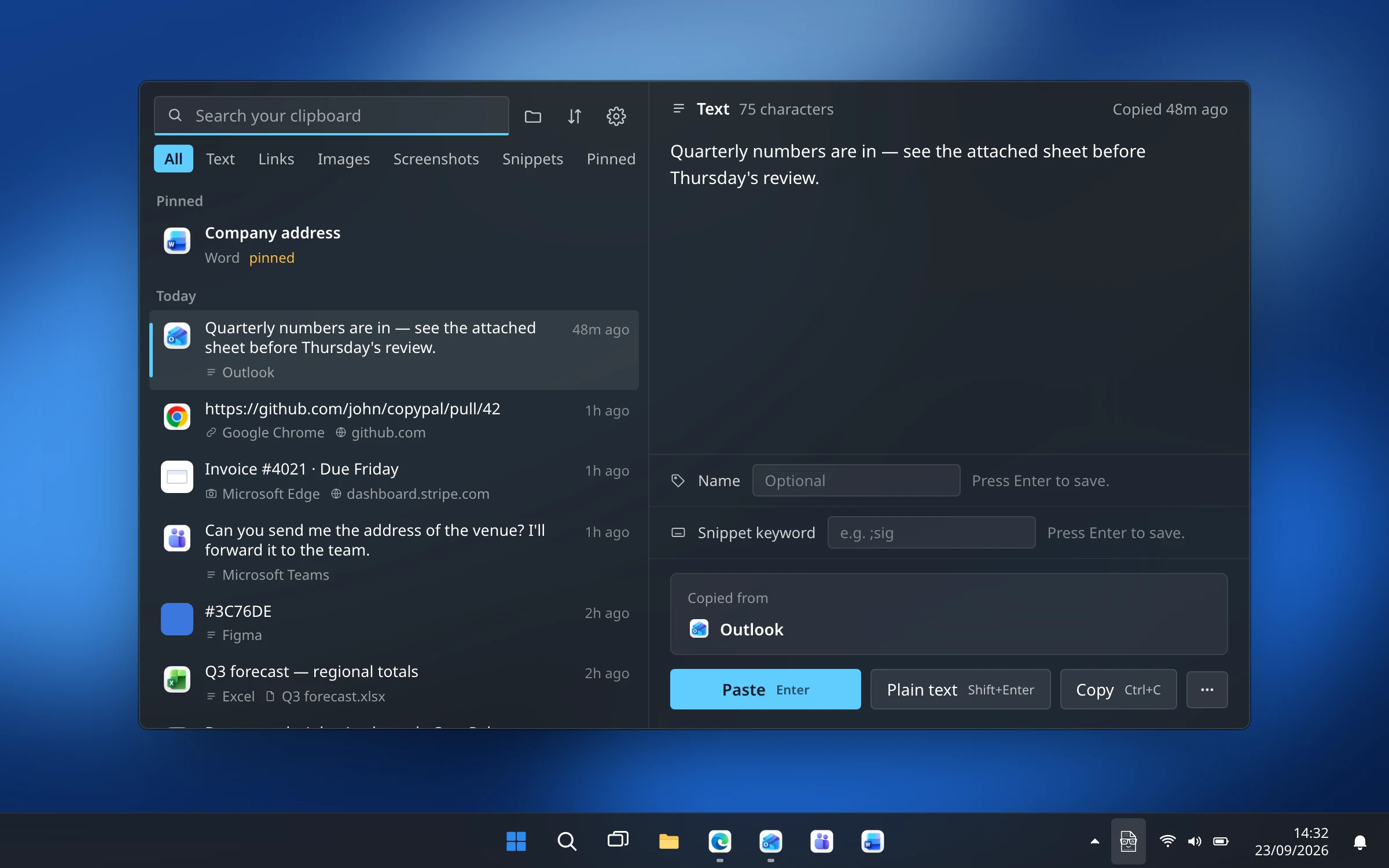
It costs $10 once and covers two devices, Mac or PC, on Windows 10 and 11, 64-bit and Arm. Our Windows clipboard manager comparison sets it against Ditto, CopyQ and the rest.
Frequently asked questions
How many items can Windows clipboard history hold?
25. When you copy a 26th item, the oldest unpinned one is removed. Each item can be up to 4 MB, and only text, HTML and images are kept. The same limits apply on Windows 11 and Windows 10.
Can I increase the clipboard history limit in Windows 11?
No. Settings › System › Clipboard only switches clipboard history and sync on or off and clears the list. Microsoft documents no setting, Group Policy or registry value that changes the 25-item or 4 MB limit. To keep more, use a clipboard manager.
Is there a registry hack to get more than 25 items in clipboard history?
Not one that Microsoft documents. Registry edits that claim to raise the limit circulate online, but none comes with evidence that it works. Editing the registry on a guess risks breaking something else, so we do not recommend it.
Does Windows clipboard history survive a restart?
Only pinned items do. Windows clears everything else each time you restart. To keep an item, press Win+V, click the three dots next to it and choose Pin.
Do pinned items count toward the 25-item limit?
Microsoft does not say. Its documentation only says that older items are removed to make room unless they are pinned. Pinned items are never pushed out, survive restarts and survive Clear all.
How do I keep more than 25 clipboard items on Windows?
Pin the items you reuse, use the Office Clipboard (24 items) inside Office apps, or install a clipboard manager. Ditto and CopyQ are free. CopyPal keeps the last 1,000 items by default, up to unlimited, survives restarts and is searchable.