 CopyPal
The best CopyQ alternatives for Windows in 2026
CopyQ is one of the most capable free clipboard managers on Windows, and it is actively developed: version 17.0.0 came out on 6 October 2026. If you are looking elsewhere, it is probably because of the setup or the interface, not because it is broken. Here are four alternatives, a short CopyQ vs Ditto comparison, and what you give up with each.
The short answer
- Free, simpler, Windows only: Ditto.
- Nothing to install: Windows Clipboard History, Windows key + V (Win+V).
- Mostly want text cleaned up on paste: ClipboardFusion, free or Pro.
- Want to find things by the app, web page or the words in a screenshot, with no setup: CopyPal, which we make. $10 once.
- Need scripting, tabs or Linux: stay with CopyQ. Nothing here does that as well.
What CopyQ does well
CopyQ is free and open source under the GPL-3.0 licence, and it runs on Windows, macOS 13 and later, and Linux, so one tool can follow you across systems. On Windows you can use the installer, a portable zip, Scoop or Chocolatey.
- Tabs. Keep clipboard history in one tab and move important items into tabs of their own.
- Editing in place. Press F2 on a text item to edit it, and F2 again to save. Ctrl+N creates a new item.
- Notes and tags on items, to find them later.
- Scripting and a command line. Almost anything can be automated, from a shortcut that pastes as plain text to rules that file items into tabs.
- Ignore rules for copies from specific windows, or containing specific text.
- Tab encryption, added in version 14.0.0 in March 2026, which locks tab data on disk behind a password.
Why people look for a CopyQ alternative
The common thread is that CopyQ is a toolkit, and toolkits take time. In practice:
- Setup. CopyQ's own FAQ explains how to open its window with a global shortcut: open the Commands dialog with F6, add the "Show/hide main window" command and assign a shortcut. Easy once you know it, but it is a step some people expect to be done for them.
- The interface. It is functional and very configurable, rather than designed to be picked up in a minute.
- Snippets through commands. There is no simple "type a keyword, get your signature" feature; you build that with commands.
- No memory of where a copy came from, and no search inside screenshots, as with Ditto.
- Big updates can need care. Version 17.0.0 moved CopyQ's data to a new folder, and its release notes warn that older versions won't see the moved files. Fine if you only go forward, but worth knowing.
None of this makes CopyQ a bad choice. If you enjoy setting tools up exactly your way, it is hard to beat.
CopyQ vs Ditto
CopyQ and Ditto are both free and open source under the GPL-3.0 licence, and both keep your history on your PC. Here is how they differ.
| CopyQ | Ditto | |
|---|---|---|
| Runs on | Windows, macOS 13+, Linux | Windows only |
| Open it | Tray icon, or a shortcut you set up | Control + backtick (Ctrl+`) by default |
| Organise | Tabs, tags and notes | Groups |
| Automate | A full scripting API, commands and a command line | On-copy and on-paste scripts, hotkeys for clips and groups |
| Between computers | Can sync a tab with a folder | Syncs between your own PCs over the network |
| Latest release | 17.0.0, 6 October 2026 | 3.25.113.0, 27 September 2025 |
Choose Ditto if you want something that works the minute you install it and stays light. Choose CopyQ if you want scripting, tabs and editing, or the same app on a Mac or Linux machine. Our Ditto alternatives guide covers Ditto in more depth.
Quick comparison
| App | Price | Search | Remembers source page | Screenshots searchable by text | Snippets |
|---|---|---|---|---|---|
| CopyQ, for reference | Free, open source | Yes | No | No | Through commands |
| Ditto | Free, open source | Yes | No | No | Hotkeys per clip |
| Windows Clipboard History | Free, built in | No | No | No | No |
| ClipboardFusion | Free; Pro from $19 | Not advertised | No | Not advertised | Macros and triggers |
| CopyPal | $10 one-time, 2 devices | Yes | Yes, app and page | Yes | Yes, keywords |
Based on each app's own website, documentation or GitHub page as of October 2026. "Not advertised" means we couldn't find the feature there. Prices and features change; check before you decide.
1. Ditto: free and familiar
Ditto is the long-standing free clipboard manager for Windows. Press Ctrl+`, type to search, and press Enter to paste into the window you were in. It keeps text, images and HTML, sorts clips into groups, lets you give a clip its own hotkey, pastes several clips at once, and can keep your own PCs in sync over the network. Its site says it works with no login, no cloud and no telemetry.
What you give up from CopyQ: the depth of CopyQ's scripting (Ditto has simpler on-copy and on-paste scripts), tabs with tags and notes, editing in place, and macOS or Linux.
2. Windows Clipboard History: nothing to install
If you only used CopyQ to grab something you copied a few minutes ago, the built-in history may be enough. Press Win+V and turn it on, or switch on Settings › System › Clipboard › Clipboard history. Windows keeps your 25 most recent copies of text, HTML and images under 4 MB each, clears them when you restart unless you pin them, and can sync them with your Microsoft account. Our guide to Win+V covers it fully.
What you give up: search, history that survives a restart, and nearly everything else.
3. ClipboardFusion: text clean-up first
ClipboardFusion, from Binary Fortress Software, the company behind DisplayFusion, is strongest at changing text on its way to the paste. It can strip formatting automatically or with a hotkey, replace text, and run macros you write in C#, with triggers that react to what you copied. The free version includes clipboard history, pinned items, images, macros and ignored apps.
Pro adds syncing with other computers and phones, and triggers that run on every clipboard change, on a timer or when a window is focused. Pro is a lifetime licence: $19 per computer, or $29 for any number of computers in your house for personal use. Every download comes with a 30-day Pro trial. It runs on Windows 10 (version 1607 and later) and Windows 11, including Arm PCs; the latest version, 6.3, came out on 20 December 2025.
What you give up from CopyQ: tabs, notes and tags, and Linux. Macros in C# are powerful but are a different kind of scripting.
4. CopyPal: finds things by where they came from
CopyPal is ours, so read this as a pitch with the reasons shown. It goes the other way from CopyQ: nothing to configure, and more done for you. Press Control + Shift + V (Ctrl+Shift+V), type, and press Enter. Every item is filed with the app it came from and, for Chrome, Edge, Firefox and Brave, the page title and address, with a button that reopens the page. Screenshots taken with Windows key + Shift + S (Win+Shift+S) are kept and the text inside them is recognised on your PC, so a search for a word finds the screenshot that contains it.
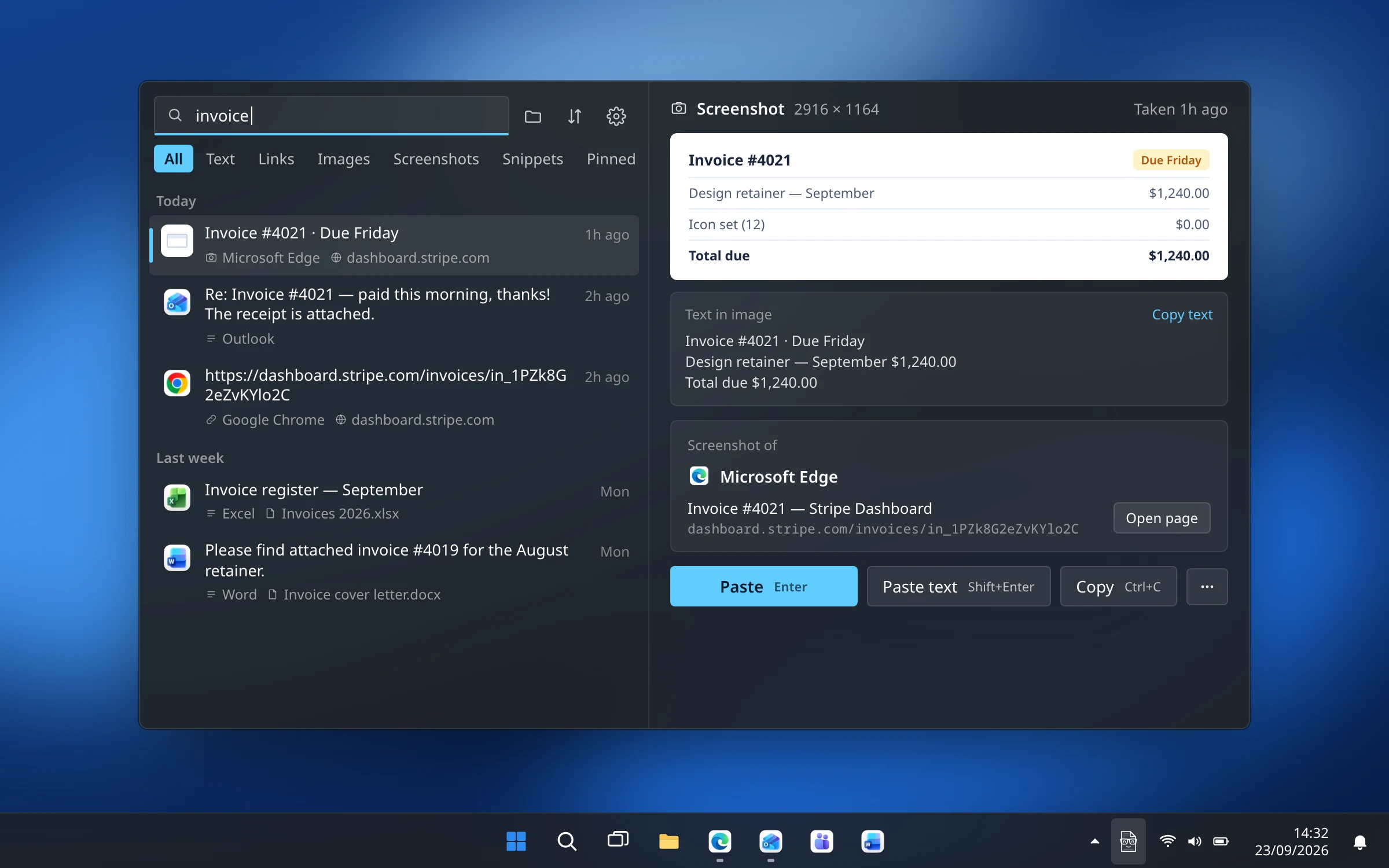
Snippets expand when you type a keyword such as ;sig in any app, something you would otherwise build with CopyQ commands. A paste stack takes items you add with Ctrl+S and pastes them all at once or one per Ctrl+V, in order; see how to paste several items at once. Pins, names and groups play the part of CopyQ's tabs. It runs on Windows 10 and 11, 64-bit and Arm, and on the Mac, and costs $10 once for two devices, Mac or PC, with a 14-day refund.
What you give up from CopyQ: free and open source, scripting, editing items in place, Linux, and sync of any kind.
How to choose
- You love scripting and tabs: stay with CopyQ.
- You want free and simpler: Ditto.
- You copy a few things a day: Win+V, and pin what matters.
- Your problem is messy formatting: ClipboardFusion.
- You want to find things by the app, page or screenshot they came from, with snippets and a paste stack, and no setup: CopyPal.
Switching from CopyQ
- History doesn't move. None of these apps advertises importing CopyQ's tabs, so keep CopyQ installed until the new app has built up a few days of history.
- Re-create the few items you rely on as pins, groups or snippets.
- Check your shortcuts. CopyPal opens with Ctrl+Shift+V, which many apps also use for paste as plain text; you can change it in CopyPal's Settings. Our guide to pasting without formatting covers the alternatives.
- Set up ignored apps again, such as your password manager.
Frequently asked questions
Is CopyQ free?
Yes. CopyQ is free and open source under the GPL-3.0 licence, and it runs on Windows, macOS 13 and later, and Linux. Version 17.0.0 came out on 6 October 2026.
Is CopyQ better than Ditto?
Neither is better for everyone. Both are free and open source. Ditto is simpler, works the moment you install it with Ctrl+`, and can sync between your own PCs over the network. CopyQ does more, with tabs, tags, notes, editing in place and a full scripting API, and also runs on macOS and Linux, but it takes more setting up.
What is a simpler alternative to CopyQ?
Ditto if you want free and familiar, or the clipboard history built into Windows, Win+V, if you only need your last 25 copies. CopyPal, which we make, is a paid option at $10 once that works without any setup and finds things by the app, web page or screenshot text.
Which CopyQ alternatives are free?
Ditto is free and open source, Windows Clipboard History is built in, and ClipboardFusion has a free version with history, pinned items, macros and ignored apps. ClipboardFusion Pro, from $19, adds syncing.
Does CopyQ work on Mac?
Yes. CopyQ's GitHub page lists macOS 13 and later alongside Windows and Linux, with downloads on its releases page. CopyPal also runs on both Mac and Windows, and one $10 purchase covers two devices, Mac or PC.